What version of Safari am I running on my iOS (iPhone, iTouch)

Apparently there’s no way to tell what version of Safari you’re running on your iPhone or iPod Touch. It’s not in the Safari app, nor in the Safari entry in Settings.

But you can type this into your Safari browser address bar:

javascript:alert(navigator.userAgent)

Or, just click here (same thing),

Here’s what it looks like on my iPhone 4s (running iOS v6.1.2)

iphone_safari_user_agent(click to enlarge)

This show’s i’m running Safari v6.0.

Actually, this works in any browser.  Eg in Firefox on Windows it gives this:

User_Agent_Mozilla_Windows

I got this tip from a tweet by Tim Acheson

HTML5

HTML5 is a set of new web development technologies that bring the mobile (ie iPhone or smartphone) experience to websites.

In doing so, they also achieve the ability to write one application and have it run the same way on the web and on an iPhone, or other smartphone.

In other words, they bring features common to smartphone apps to web development, namely

  • Touch events
  • Swipe events
  • Pinch zoom in/out
  • Location access (eg GPS)
  • Camera access
  • Offline storage, eg each app can store data, info, files
  • Offline app usage.
    • Web apps require you to be online to run them. They have always been websites up til now.
    • Most smartphone apps run whether or not you’re online
    • HTML5 allows web apps to run while offline, like smartphone apps

Here’s a quote of the text of html5.org, captures 8/25/2013, a good overview of HTML5 resources:

html5.org


HTML5 is the latest version of HTML and XHTML. The HTML standard defines a single language that can be written in HTML and XML. It attempts to solve issues found in previous iterations of HTML and addresses the needs of Web Applications, an area previously not adequately covered by HTML.

Here are several resources worth exploring:

The best way to get Flash Updates (Hint: DON’T click DOWNLOAD)


We all need flash. It’s a given. Because Adobe (the maker of Flash Player) knows that, they take every opportunity to track you and install their extra programs on your computer.

We dont want any of that.

It used to be an extra program “GetPlus” came along for the ride, but that annoyance seems to have subsided. Now they sometimes sneak in McAfee Scanner. I trust McAfee, but if you already have antivirus, this programs adds little and runs all the time, slowing down your system. And who knows what they’ll put in the future?

So when you get this window:
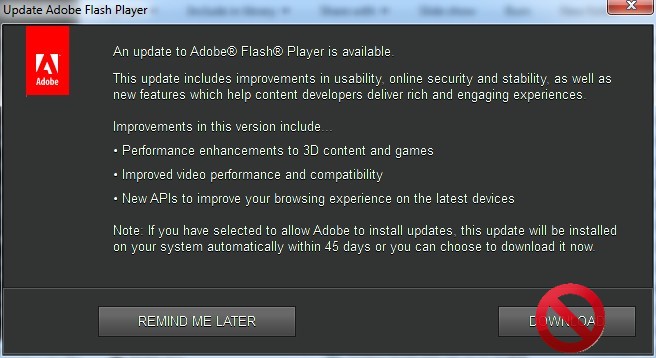
flash_update_notification_window_with_stop
[This specific example is for the v16.0.0.235 update]

DON’T click DOWNLOAD

Note: if you dont see this window, it might be because your adobe flash is set to download and install updates automatically. You can change this in the flash entry in control panel (blog post coming soon).

Two ways

1. My personally verified safe files

I plan to keep the following location up to date with the latest download files, selected and verified by me: Montgomery Minds box.com Flash Player file storage. (If that doesnt work try this or this.) That page has hash values and exact files sizes in the description for each file, and in the source.txt file in that folder.

(You can browse all the files i have for download at: Montgomery Minds box.com file storage)

At the end of your install you’ll see that “Allow Adobe to install updates” is checked by default–BAD. That will let them install whatever they want next time. Instead, check “Notify me to install updates” and then check Montgomery Minds box.com Flash Player file storage next time you are notified, and download from there.
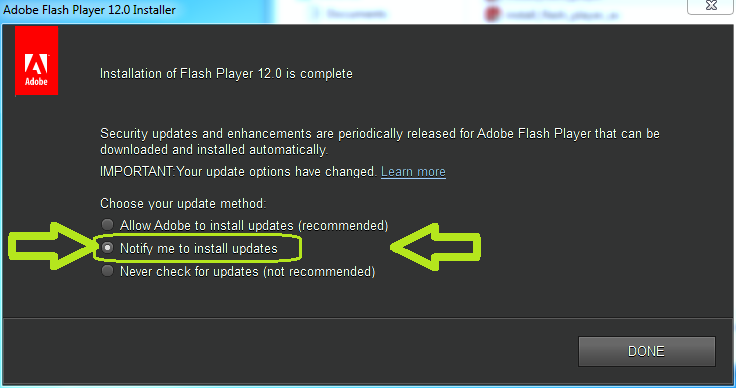
install_flash_player_dont_update_automatically_hilit

2. Second-best way

Or, as of 2/16/2015, the next best recommendation is go to the Adobe FlashPlayer FAQ / Flash Player Help / Installation problems (its title keeps changing) and search for something called something like “direct link” or “downloading the installer directly”. It is often in a section dealing with download or installation problems, eg, “Still having problems?” and listed as an alternative to the default installation method. That’s good, because the default installation method is “heavier”, containing as much junk as adobe can put in there. For a while now, the direct link filename has been called something like "install_flash_player.exe" and "install_flash_player_ax.exe" for IE (Internet Explorer). Mouse over the link that looks like the “direct link” and see if the file name is something like that. Note that the filename "install_flashplayer11x32_mssd_aaa_aih.exe" is not a good one.

Also note the size.

The direct link "install_flash_player.exe" today is 17.4MB. That’s big. That’s good.

The “network install” more invasive method "install_flashplayer11x32_mssd_aaa_aih.exe" today is 1.0MB. That’s small. That’s bad. That means it’s really going to contact the adobe website to download the real stuff.

Direct Link – Example URLs

Here’s a direct link accurate as of this writing: http://fpdownload.macromedia.com/pub/flashplayer/latest/help/install_flash_player.exe (at the time it was version 16.0.0.235).

And http://fpdownload.macromedia.com/pub/flashplayer/latest/help/install_flash_player_ax.exe for IE.

And http://fpdownload.macromedia.com/pub/flashplayer/latest/help/install_flash_player_ppapi.exe for Chromium based browsers and Opera

  • (A flash specifically for Chromium based browser and Opera is relatively new, ie, appeared in 2014. The standard Chrome browser however does not use this–it has flash support built-in.)

Check version, Check installation

No matter how you get your files, to check whether your installation is working, or what version you have, or whether you have the latest, try one of these two pages (valid as of 1/3/2014; they keep changing):

If that doesnt work, Google check flash version site:www.adobe.com or validate flash installation site:www.adobe.com, ie only on the adobe.com site to protect yourself from malware, or better yet, DuckDuckGo it eg: https://duckduckgo.com/?q=check%20flash%20version%20validate%20flash%20installation+site:www.adobe.com

References:
“Get Adobe Flash Without GetPlus in Firefox” on techsupportalert.com

“Get Adobe Flash and Reader without GetPlus in Firefox”
and updated “Download the Latest Adobe Flash for Firefox and IE Without Any Extras”

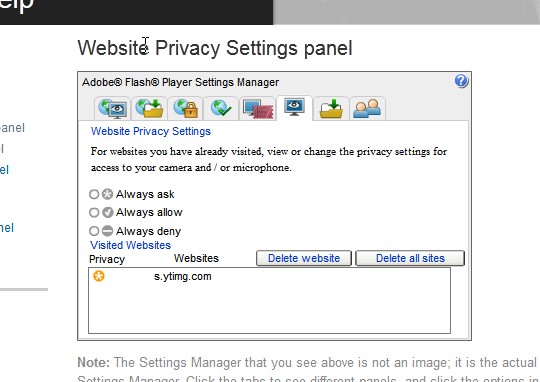
Flash (ie youtube video player) keeps a list of all website you’ve visited.

To see it, click here. It is called the Adobe – Flash Player : Settings Manager and it has several “panels”. Obscurely, the list of visited sites is in the Website Privacy Settings panel because it lists the privacy settings of all your visited sites. Full title is
Adobe – Flash Player : Settings Manager – Website Privacy Settings panel. It looks something like this:
screen_cap_flash_settings_mgr

The Windows Registry

The Windows Registry replaces .ini files. It is a place where programs store the data they need to run. Eg, configuration settings.

Some key facts to remember.

Root Keys

[P] – primary key
[A] – alias to some other key in the registry

  1. [A] HKEY_CLASSES_ROOT (HKCR)
    • On Windows 2000 and above, HKCR is a compilation of user-based HKCU\Software\Classes and machine-based HKLM\Software\Classes. If a given value exists in both of the subkeys above, the one in HKCU\Software\Classes takes precedence.
  2. [A] HKEY_CURRENT_USER (HKCU)
    • a link to the subkey of HKEY_USERS that corresponds to the user; the same information is accessible in both locations
  3. [P] HKEY_LOCAL_MACHINE (HKLM)
  4. [P] HKEY_USERS (HKU)
  5. [A] HKEY_CURRENT_CONFIG (HKCC)
    • It is a handle (alias) to the key "HKEY_LOCAL_MACHINE\System\CurrentControlSet\Hardware Profiles\Current" (only exists in Windows 9x/Me and NT-based versions of Windows)
  6. HKEY_PERFORMANCE_DATA (only in NT-based versions of Windows, but invisible in the Windows Registry Editor)
  7. HKEY_DYN_DATA (only in Windows 9x/Me, and visible in the Windows Registry Editor)

hive file locations

The Registry is stored in hive files.

Note:

  • %SystemRoot% is usually c:\windows
  • %UserProfile% is usually
    w2k w2003 wxp
    c:\Documents and Settings\[USERNAME]
    Vista w7 w8
    c:\users\[USERNAME]
HKEY_LOCAL_MACHINE\SAM
%SystemRoot%\System32\Config\SAM

  • (SAM stands for “Security Accounts Manager”)
HKEY_LOCAL_MACHINE\SECURITY
%SystemRoot%\System32\Config\SECURITY
HKEY_LOCAL_MACHINE\SOFTWARE
%SystemRoot%\System32\Config\SOFTWARE
HKEY_LOCAL_MACHINE\SYSTEM
%SystemRoot%\System32\Config\SYSTEM
HKEY_USERS\.DEFAULT
%SystemRoot%\System32\Config\DEFAULT
HKEY_USERS\[User SID] (HKEY_CURRENT_USER)
%UserProfile%\NTUSER.DAT
HKEY_USERS\[User SID]_Classes (HKEY_CURRENT_USER\Software\Classes) (part of HKEY_CLASSES_ROOT)
w2k w2003 wxp
%UserProfile%\Local Settings\Application Data\Microsoft\Windows\UsrClass.dat (path is localized)
Vista w7 w8
%UserProfile%\AppData\Local\Microsoft\Windows\UsrClass.dat (path is not localized)

Reference: https://en.wikipedia.org/wiki/Windows_Registry

Acronis True Image Home: Supports RAID

Quote of Acronis True Image Home: RAID Support | Knowledge Base.

Knowledge Base

11681: Acronis True Image Home: RAID Support

Printer-friendly versionRAID support scheme in Acronis True Image Home and Acronis True Image Home Plus Pack

This article applies to:

  • Acronis True Image Home 2012
  • Acronis True Image Home 2011
  • Acronis True Image Home 2010
  • Acronis Backup and Security 2010
  • Acronis Backup and Security 2011

Description

The official support scheme for RAID configuration is the following:

More information

You can restore a backup of one RAID to a RAID of different type in the same manner as you would with a basic disk.

Here is the Acronis True Image Home RAID support matrix:

Hardware RAIDs Acronis True Image Home Acronis True Image Home Plus Pack
RAID 0 YES YES
RAID 1 YES YES
RAID 5 YES YES
RAID 0+1 YES YES
RAID 1+0 YES YES
Software RAIDs
Simple NO YES
Spanned NO YES
Striped NO YES
Mirrored NO NO
RAID 5 NO NO

Software Mirrored RAID can be created only in the following operating systems:

  • Windows 7 Professional
  • Windows 7 Enterprise
  • Windows 7 Ultimate
  • Windows 2000 Server
  • Windows Server 2003
  • Windows Server 2008

Software RAID 5 can be created only in the following operating systems:

  • Windows 2000 Server
  • Windows Server 2003
  • Windows Server 2008

See also Dynamic Disk Types Support in Windows Editions.

From: Acronis True Image Home: RAID Support | Knowledge Base.


HTML5 offline apps for iphone

there’s some special meta tags you can put in a webpage to make your web apps avable and full screenable to the iphone hard drive. (so it can work offline) Here’s an example : http://mrgan.tumblr.com/post/125490362/glyphboard2 [or view source of http://mrgan.com/gb/]

There’s also frameworks like phonegap that let you access cocoa apis from javascript, but it sounds like you don’t need that.

answered Jun 25 ’09 at 13:18

Breton

via ruby – Develop iPhone app without a Mac? – Stack Overflow.

Reference: https://developer.apple.com/library/ios/documentation/AppleApplications/Reference/SafariWebContent/ConfiguringWebApplications/ConfiguringWebApplications.html

CHKDSK windows cmd line tool – Microsoft In-Depth discussion

Here is Microsoft’s in-depth discussion of what CHKDSK does. An overview can be found here.

This KnowledgeBase article claims to be about the new /C and /I switches, but the article goes on to say

To understand when it might be appropriate to use the /C and /I switches, you need a basic understanding of some of the internal NTFS data structures, the kinds of corruption that can take place, what actions CHKDSK takes when it verifies a volume, and what the potential consequences are if you circumvent CHKDSK’s usual verification steps.

So the article really winds up being about chkdsk in general.

Continue reading

CHKDSK Windows cmd line tool – Microsoft overview


(cuz the yellow highlight color below was chosen for white (light) chars on black background)
Here’s microsoft’s overview of the CHKDSK Windows command line tool.  An in-depth discussion can be found here.

Quote microsoft:

Chkdsk

Creates and displays a status report for a disk based on the file system. Chkdsk also lists and corrects errors on the disk. Used without parameters, chkdsk displays the status of the disk in the current drive. Continue reading

How to Stop “Magnifier” from Starting When Windows Starts (ie at boot time)

The Magnifier, in Windows Vista and 7, zooms in on a part of the screen to make it bigger.  But you dont necessarily need it starting when windows starts.  To prevent it from starting when windows starts:

Open the Control Panel. (Start>Control Panel).

Click on “Ease of Access”.
Under “Ease of Access Center”, click on “Optimize Visual Display”.
Make sure that the box next to “Turn on Magnifier” is unchecked.
Click “Save”.
The magnifier should no longer automatically run at startup.

Widows Vista was similar, but a little different.

From: http://answers.microsoft.com/en-us/windows/forum/windows_vista-windows_programs/how-do-i-stop-magnifier-initialising-at-startup/b014e91d-8f89-4c8e-a487-d92e1feb3699