vivaldi.net and other free webmails

Consider my comment at techsupportalert.com:

vivaldi.net webmail is one to consider.

the webmail (not pc client program) in myopera was pretty good. It was part of the whole myopera community. It went “out of business” as of 3/1/2014. Ie tomorrow 😉 However the developers created Vivaldi.net; It is also a whole community. When i load their pages and watch the websites go buy in the lower left of firefox, i do not see many other sites go by besides vivaldi.net. In fact i just double checked now, and the ONLY website i saw go by was vivalid.net. Their servers are located in Iceland for, among other things, their commitment to free speech. It appears on first glance very open source mindset friendly.

Their vivaldi mail is a hosted roundcube program. I have found roundcube only meh. But free as in freedom is a big plus. Altho this is just a first impression, i dont really “know” the community.

The tech world is changing. There use to be “free as in beer” and “free as in freedom”. Now there’s also “free as in build a profile on you and sell it for ad targeting”.

Some other notes:

vivaldi does not (currently) require a cell phone to register. They require an alternate email which they use for “forgot password” retrieval. gmail and yahoo both require a cell phone these days.

gmx.com is another “very free” email. It is very Ad HEAVY. From a couple hours surfing, it has mixed reviews. Gmx has the advantage that it does not (currently) require a cell phone nor even an alternate email address to register. Their “forgot password” retrieval is based on a security question.

Hi-End Desktop PC Comparisons

click to go directly to comparison table Loading


In Jan 2014, we’re talking 4g Intel i7 processor (or equivalent AMD processor, but probably not). These CPUs should last 6-8 years (so until 2018-2020) and i would not expect to reach that grind-to-a-halt state until 8-10 years (2022).

With Intel Core i7, you want to watch the socket. More likely to get an upgrade processor in the future that fits that socket, rather than a whole new mother board.

Today 4GB is enuf to run widows 7 adequately. It doubles every 2 years, so

  • 2014: 4GB
  • 2016: 8GB
  • 2018: 16GB
  • 2020: 32GB
  • 2022: 64GB
  • 2024: 128GB

You dont need all that memory now, but you want to be able to upgade to it, so you want the motherboard and chipset to support it.

Also you want to make sure your memory is taking advantage of dual channel, then means 2 (or 4) memory cards, 1 (or 2) in each channel.

If you’re going hi-end, you want a large SSD. 256GB are available, even 512GB. I even saw one ~700GB. And now 1TB.

For flexibility, get 2 x 5.25inch bays. That way you dont have to swap disks if you’re copying. Many PCs these days come with only DVD-writers, maybe blu-ray reader-only. Eventually, you are probably going to want a blu-ray reader, and/or writer. This is a $100-$200 upgrade plus installation now. If you want to watch blu-ray movies now, the upgrade has to be now. If you want to wait, the upgrade will be $50-$100 plus installation.

USB 3.0 is getting more popular. Almost everything in existance is USB 2.0 right now. So get USB 3.0. At least 4 ports. There’s a faster version of 3.0 coming out very soon (out already? Jan 2014?), but even today’s USB 3.0 is 10x USB 2.0.

You want *ALL* SATA III ports, no SATA II.

The 11 Places I shop:

  • TigerDirect
  • newegg
  • Best Buy
  • Walmart
  • Staples
  • OfficMax
  • OfficeDepot
  • JR.com
  • CDW
  • overstock.com
  • Beach Audio
  • b h photo video?

Here are the choices available from different vendors in this price range for this performance. Note date of price check for each PC listed.

Table Notes:


Loading

hilit
choice number
as_of
price
shipping
product
vendor
OS (home/pro 32/64bit)
processor
chipset
Motherboard
memory
memory pre nstalled
max memory
mem type, speed
mem slots total
disk
disk size
disk rpm
disk SATA speed (II 3Gb/s, III 6Gb/s
disk SSD
disk 3.5 bays total
disk 2.5 bays total
optical drive / 5.25 bays
optical drive (blu-ray rd/wr? / dvd-wr?)
5.25 bays total
usb 3.0
usb 3.0 – front
usb 3.0 – rear
usb 3.0 – top
usb 2.0
usb 2.0 – front
usb 2.0 – rear
usb 2.0 – top
ports slots net power
hdmi
dvi
pci slots
sata ports
Ethernet RJ45 100Mbps or Gigabit 1000Mbps
power supply
Warranty
Small Form Factor (SFF)?

Loading

List of Intel Chipsets <https://en.wikipedia.org/wiki/List_of_Intel_chipsets>

Notes

    Processor

    The difference between 3rd Generation and 2nd Generation intel processors is not that great:
    EG,

    Feature 2nd Generation 3rd Generation
    Graphics HD 2000 HD 2500
    Graphics HD 4000
    Mem Speed 1333MHz 1600MHz 20% faster

    Store Notes

    2/12/2014: BestBuy had no 4G Core i7 by HP (they had 3G Core i7, 4g Core i5, and Xeon, but not 4G Core i7)

    Example Decision :

    tbd

    proc
    item plce price + shipping note shipping time

    Product variations :

    prod id processor memory form factor os other os
    e1z89ut i74770 4gb tower win 7 pro 64bit win 8 64bit
    e1z??ut i545?? 4gb tower win 7 pro 64bit win 8 64bit
    – – – – – – – – – – – – – – – – – – – –
    f4k11ut i74770 4gb tower win 7 pro 64bit win 8.1 64bit
    f4k13ut i74770 4gb tower win 8.1 pro 64bit win 7 64bit
    f4k93ut i74770 4gb sff win 7 pro 64bit win 8.1 64bit
    – – – – – – – – – – – – – – – – – – – –
    g5r??ut i74770 4gb tower win 7 pro 64bit win 8.1 update 1 (i guess) 64bit
    g5r46ut i74790 4gb tower win 7 pro 64bit win 8.1 update 1 (i guess) 64bit
    – – – – – – – – – – – – – – – – – – – –
    j6d??ut i74770 4gb tower win 7 pro 64bit win 8.1 update 2? 64bit
    j6d83ut i74790 4gb sff win 7 pro 64bit win 8.1 update 2? 64bit
    j6d87ut i74790 4gb tower win 7 pro 64bit win 8.1 update 2? 64bit
    j6d89ut i54590 4gb tower win 7 pro 64bit win 8.1 update 2? 64bit

    Loading


    What Secrets Your Phone Is Sharing About You

    “Businesses Use Sensors to Track Customers, Build Shopper Profiles”

    From Wall Street Journal Article <http://online.wsj.com/news/articles/SB10001424052702303453004579290632128929194>

    By Elizabeth Dwoskin

    Jan. 13, 2014 8:47 p.m. ET

    Fan Zhang, the owner of Happy Child, a trendy Asian restaurant in downtown Toronto, knows that 170 of his customers went clubbing in November. He knows that 250 went to the gym that month, and that 216 came in from Yorkville, an upscale neighborhood.

    And he gleans this information without his customers’ knowledge, or ever asking them a single question.

    Mr. Zhang is a client of Turnstyle Solutions Inc., a year-old local company that has placed sensors in about 200 businesses within a 0.7 mile radius in downtown Toronto to track shoppers as they move in the city.

    The sensors, each about the size of a deck of cards, follow signals emitted from Wi-Fi-enabled smartphones. That allows them to create portraits of roughly 2 million people’s habits as they have gone about their daily lives, traveling from yoga studios to restaurants, to coffee shops, sports stadiums, hotels, and nightclubs.

    “Instead of offering a general promotion that may or may not hit a nerve, we can promote specifically to the customer’s taste,” says Mr. Zhang. He recently emblazoned workout tank-tops with his restaurant’s logo, based on the data about his customers’ gym visits.

    Turnstyle is at the forefront of a movement to track consumers who are continuously broadcasting their location from phones. Other startups, such as San Francisco-based Euclid Analytics Inc., use sensors to analyze foot-traffic patterns, largely within an individual retailer’s properties to glean insight about customer behavior.

    Their success speaks to the growing value of location data. Verizon Wireless last year began crunching its own location information from customers to help retailers see which neighborhoods shoppers arrived from or limited information about their habits, such as restaurants they drive past. Apple Inc. recently released its iBeacon technology, which can be integrated into sensors to read customer’s smartphone signals in brick-and-mortar stores.

    But Turnstyle is among the few that have begun using the technology more broadly to follow people where they live, work and shop. The company’s dense network of sensors can track any phone that has Wi-Fi turned on, enabling the company to build profiles of consumers lifestyles.

    Turnstyle’s weekly reports to clients use aggregate numbers and don’t include people’s names. But the company does collect the names, ages, genders, and social media profiles of some people who log in with Facebook to a free Wi-Fi service that Turnstyle runs at local restaurants and coffee shops, including Happy Child. It uses that information, along with the wider foot traffic data, to come up dozens lifestyle categories, including yoga-goers, people who like theater, and hipsters.

    A business that knows which sports team is most favored by its clients could offer special promotions on game days, says Turnstyle’s 27-year-old founder Chris Gilpin. Czehoski, a local restaurant, hired an ’80s-music DJ for Friday nights after learning from Turnstyle that more than 60% of the restaurant’s Wi-Fi-enabled customers were over 30.

    But as the industry grows in prominence, location trackers are bound to ignite privacy concerns. A company could, for example, track people’s visits to specialist doctors or hospitals and sell that data to marketers.

    “Locations have meanings,” says Eloise Gratton, a privacy lawyer. Marketers can infer that a person has a certain disease from their Internet searches. A geolocation company can actually see the person visiting the doctor, “making the inference that the individual has this disease probably even more accurate,” she says.

    Mr. Glipin says his data doesn’t include doctors visits or sensitive health information, nor does he sell his profile data to marketers. He is considering offering more detailed profiles based on the logged-in information, an endeavor that would be legal in Canada as long as consumers provided consent.

    “We know there is more value to be extracted from this data,” Mr. Gilpin says. “But we’re wanting to move cautiously and turn on the tap slowly—in a way that doesn’t offend customers.”

    In the U.S., companies don’t have to get a consent before collecting and sharing most personal information, including their location. A bill, proposed by Minnesota Senator Al Franken, would require consent before collecting location data. The U.S. Federal Trade Commission settled its first location privacy case in December, against an app developer that misled consumers into believing their location data wouldn’t be sold to marketers.

    Some customers have concerns. Aj Tin, a university student and customer at Rsquared Café, was surprised to learn that by logging into the Wi-Fi at the coffee shop, he was enabling Turnstyle to track his movements and offer other local businesses an aggregated profile of his activities. The disclosure form tells consumers they will be tracked, but not how aggregated personal information will be distributed. “Privacy is cheap,” Mr. Tin said.

    Even as they covet the data, stores and businesses recognize it is a touchy subject. “It would probably be better not to use this tracking system at all if we had to let people know about it,” says Glenna Weddle, the owner of Rac Boutique, a women’s clothing store that is a Turnstyle client. “It’s not invasive. It might raise alarms for no reason.”

    Viasense Inc., another Toronto startup, is building detailed dossiers of people’s lifestyles by merging location data with those from other sources, including marketing firms. The company follows between 3 million and 6 million devices each day in a 400-kilometer radius surrounding Toronto. It buys bulk phone-signal data from Canada’s national cellphone carriers. Viasense’s algorithms then break those users into lifestyle categories based on their daily travels, which it says it can track down to the square meter.

    For example, by monitoring how many times a consumer visits a golf course in a month, Viasense can classify her as a casual, intermediate or heavy golfer. People whose cellphones move at a certain clip across city parks between 5:30 and 8:30 every morning are flagged by the algorithm as “early morning joggers.” The company identifies “youth” by looking at phone signals coming from schools during school hours and nightclubs, and home locations by targeting the places phones spend each night.

    Viasense, which says its clients are grocery chains, a large concert venue and a billboard company, then overlays that data with census and marketing lists the company buys from data brokers to deduce demographic information, like whether the cellphone’s owner is in a high-income bracket.

    Viasense doesn’t gather personal information or know any of its users’ names, but CEO Mossab Basir says it is simple to figure this out. A person who has enabled location services on an app in which they upload information publicly, such as Twitter, is broadcasting their location and their identity—or at least their handle—at the same time. “People are probably unaware of how much they are making available,” says Mr. Basir. “That’s why it’s a very delicate subject for us. It’s kind of Big Brotheresque.”

    A username is considered personal information, which under Canadian law can’t be collected without the consent of the user. In most of the U.S., consent wouldn’t be required.

    Right now, the only way to opt-out of geolocation is to either switch off the Wi-Fi on a cellphone, or make a request through a website of one the data companies like Turnstyle that has an opt-out option.

    As these companies operate mostly behind the scenes, the nascent industry is keeping a close watch on Google and Apple. With their Android and iOS mobile operating systems, respectively, Google and Apple know the location of every customer’s Wi-Fi-enabled phone—far more location data than any startup could access. The Silicon Valley giants aren’t allowing access to such data by outsiders. Both Google and Apple declined to comment.

    Places where people didn’t think they were being watched are now repositories for collecting information, says Ryan Calo assistant professor at the University of Washington School of Law. “Companies are increasingly able to connect between our online and offline lives,” he says.

    —David George-Cosh in Toronto contributed to this article.

     

    Also from same author at <http://blogs.wsj.com/five-things/2014/01/14/5-things-to-check-to-see-whether-companies-are-tracking-your-phone/> “5 Things to Check to See Whether Companies Are Tracking Your Phone”

    1 Your Cell Phone Carrier Knows, and Is Beginning to Share

    Cell phone carriers have always known your location because the phone must send signals to cell towers. Verizon, and soon AT&T, have businesses selling this data to retailers, billboard advertisers, and stadium owners.

    Users can’t turn off those signals. But they are generally anonymous. Verizon asks users to agree to let it share their identity with its brick-and-mortar customers, which can lead to pings from nearby merchants when shopping.

    Firefox new TAB page, vs new window page

    Unfortunately, in Firefox (by Mozilla) the default start page for a new tab differs from that for a new window.

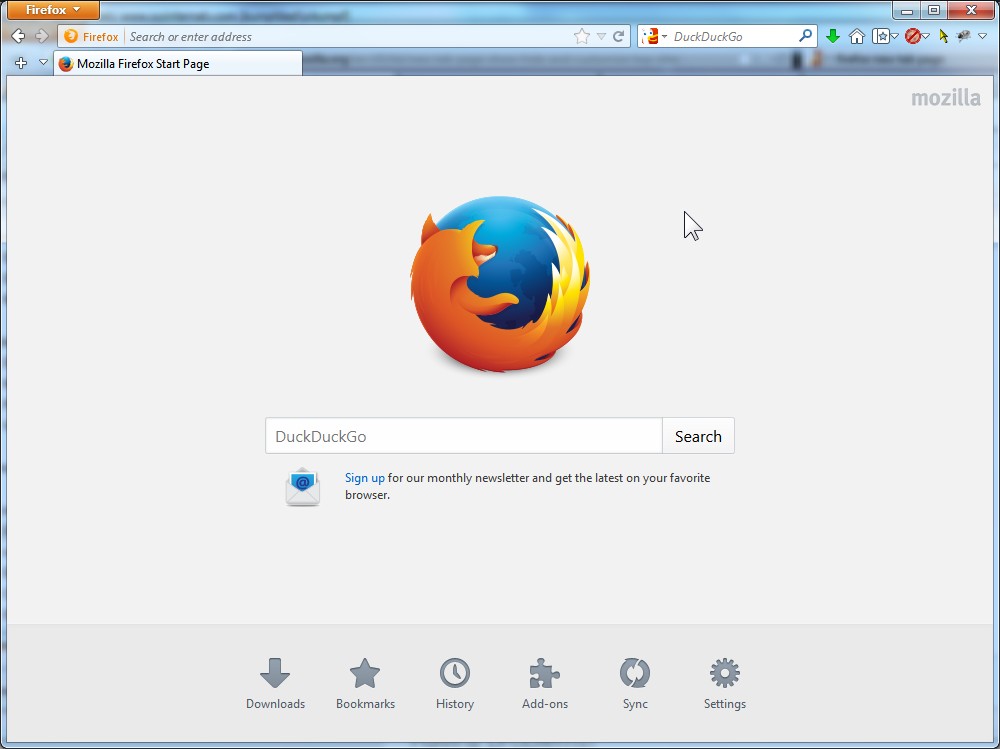
    For the more common new window, the default page in the “Mozilla Start Page”:

    mozilla_start_page_google

    That has Google search build in.

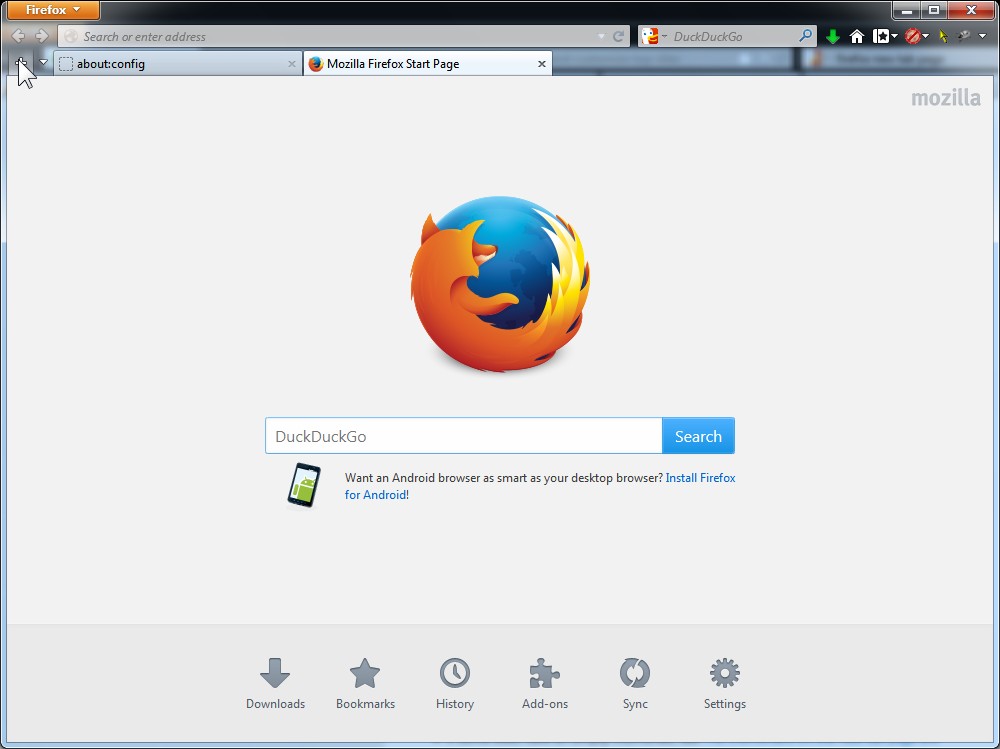
    Of course i like DuckDuckGo.com, so my Mozilla Start Page is set with the DuckDuckGo search engine, replacing google:

    mozilla_start_page_duckduckgo

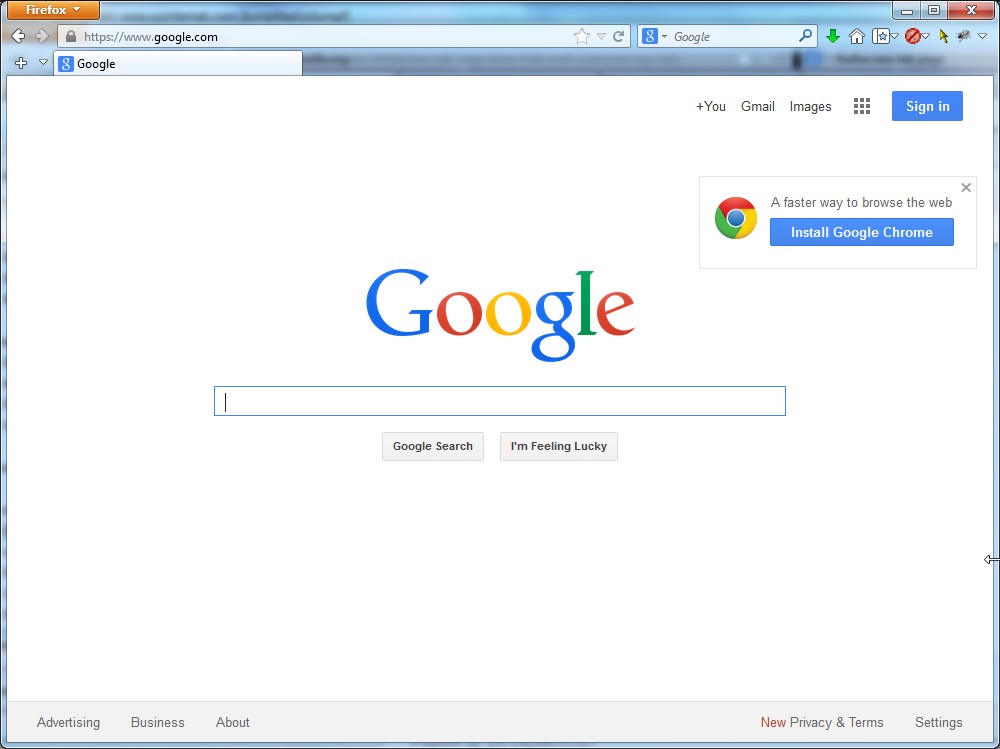
    Then again, probably the most popular home page is the world is the google home page, super simpler, less-is-more:

    google_home_page

    But, for the new tab in Firefox, it’s different.

    The default is the “Speed Dial” page:

    firefox_new_tab_speed_dial

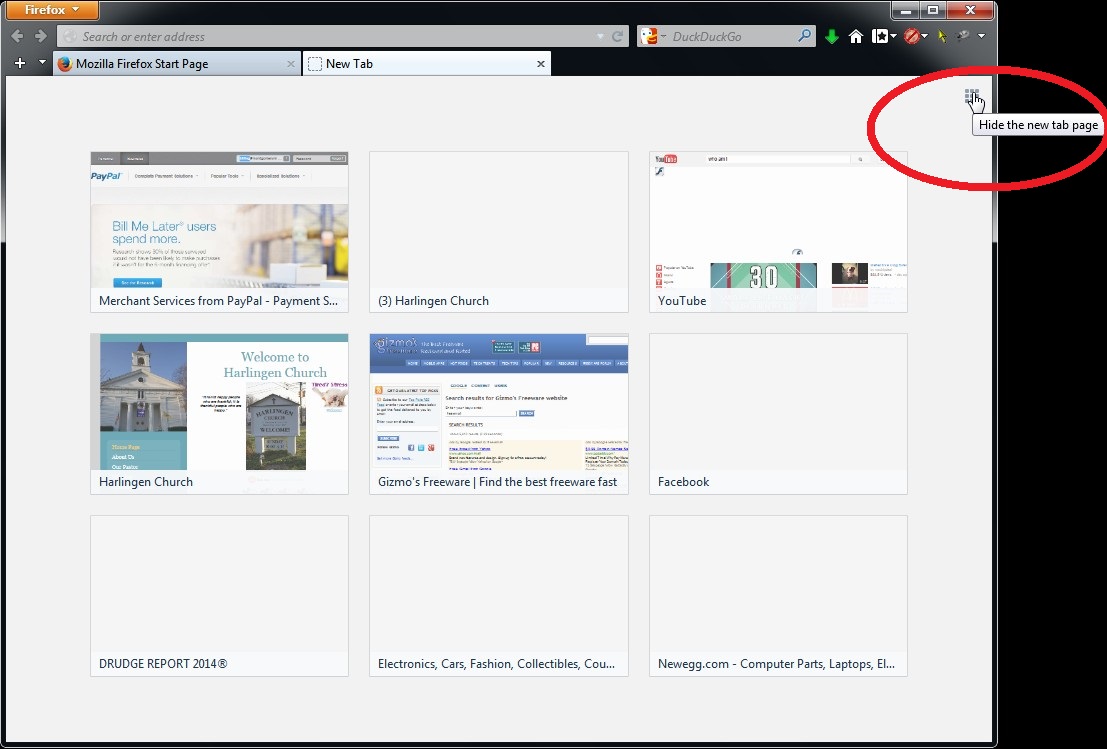
    If you dont like that, you can hide it off by clicking the tab button in the upper right corner.

    firefox_hide_new_tab_page-w-oval

    Of course, then your new tab page is just blank.

    firefox_new_tab_blank

    That’s not very interesting, helpful, or convenient.

    However, something obvious, say, making your new tab page the SAME as your new window page, is surprisingly non-obvious.

    You have to use the advanced, somewhat dangerous about:config page.

    Type about:config in the address box (NOT the google search box):

    firefox_about_config_warning

    You will get the warning above. Click “I’ll be careful. I promise”.

    Oh, and, please, do, be careful. Only change this ONE thing.

    What thing? Well, type newtab in the search box (not the address bar):

    firefox_about_config_newtab

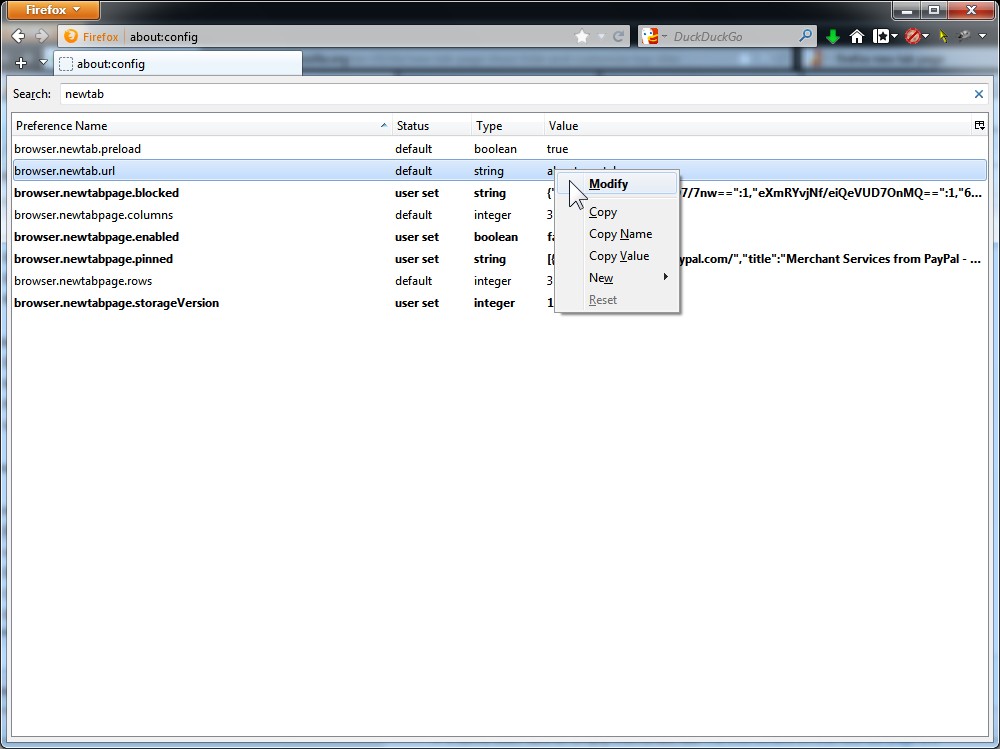
    It should find name "browser.newtab.url" on the left, with value "about:newtab" on the right.

    RIGHT click on that value, and click Modify:

    firefox_about_config_newtab_modify

    You’ll get a pop-up window. Type in a new value, eg about:home

    firefix_about_config_new_tab_modify_about_home

    This particular value will make your new tab go to the default Mozilla Start Page.

    firefox_new_tab_mozilla_home_page

    Or, modify the value to be google.com

    firefix_about_config_new_tab_modify_google

    This will make a new tab go to the google home page. You can set it to exactly what your home page is.

    firefox_new_tab_google

    Windows Desktop Applications Sending Mail (MAPI) via Webmail Like Gmail, Yahoo, Hotmail, AOL

    Say you are in a Windows desktop application.  This means you are not in your web browser.  You’re not in Internet Explorer.  You’re not in Firefox.  You’re not in Opera.  You’re in some other program, and you want to send email from that application.

    You might be in Microsoft Word and you click on File -> Send to Mail recipient.

    Or you might be using the free Word-replacement program, LibreOffice. Or its cousin, Apache Open Office (formerly, OpenOffice.org).  In Open Office it would look like this:OOO-mapi-gmail-0

    Or, in Windows XP there was, and in Windows 7 there is, a context menu (ie, right-click) in Windows Explorer (aka “My Computer” in WXP or “Computer” in W7) with a menu option: ‘Send to -> mail recipient’.

    Windows 7 Explorer even has an “E-mail” button that looks like this:020620win20exp-10472786

    Or, you can do it from Windows Photo Viewer, or WinZip.

    Any number of desktop programs may have an option to “send as email attachment”.

    Or, consider Picasa.  Here’s Google’s instructions (Google makes Picasa) for how you email pictures from Picasa <https://support.google.com/picasa/answer/104211?hl=en>

    You can email photos from Picasa in a few easy steps:

    1. Select the photos you’d like to email.
    2. Click the Email button.
    3. Select from the following email options:
      • Google Mail
        • Gmail: Gmail is ideal to use for sending pictures in Picasa. Attach up to 20 MB of photos in a single email. You can sign up for Gmail in a few easy steps. Learn more.
        • Google Account email: If you want to use a non-Gmail address to send photos, this option may be for you. You can associate any email address with a Google Account and use this address to send mail through Picasa. Learn more.
          Non-gmail Google Accounts have an attachment limit of ten items.

          [Of course, that means you have to sign up for a google account, and not everyone wants to to that! -Montgomery Minds]

      • Use your default email program: By setting your email program as the default on your computer, you can use this email provider in Picasa.

    (FYI this blog post at “Gils Method” has nice, easy to read instructions for emailing pics from Picasa)

    Now what did they mean by “setting your email program as the default”? If you follow their link to https://support.google.com/picasa/answer/11064 they will tell you how, on your computer, you can set an email program as default.

    Trouble is, almost everyone nowadays has Webmail. But your Windows (any version) “default email program” has to be a program installed on your computer.  It can not be Webmail.  But everybody has Webmail.

    So,  yes, this system is broken.  🙁 

    Technical jargon: the method by which desktop (or laptop, but not web) computer programs do email with each other is called MAPI (Messaging Application Programming Interface).  Outlook, Outlook Express, Mozilla Thunderbird, Eudora and M2 are all MAPI-compliant email programs that you install and run on your PC.  They are not Webmail.  They dont use your web browser.  But they can all server as your “windows desktop default email program”.

    Gmail, Hotmail, Yahoo mail, and AOL Webmail, can not (well, not without some additional tricks).

    Windows XP came with Outlook Express installed on your PC by default, and set as your “windows desktop default email program”, but Windows Vista? and 7 have no program installed by default.  In that case you get this error when you try to invoke any of the desktop email features described above:

    There is no email program associated to perform the requested action. Please install an email program or, if one is already installed, create an association in the Default Programs control panel.

    There are solutions, but note, the following solutions present security and privacy concerns.  See below.

    The Gmail notifier, a separate program you download to your computer, may or may not have an option to install a small MAPI-compliant program that can serve as your “windows desktop default email program”.  It then does everything thru the Gmail Webmail interface (as if you were doing Gmail yourself normally).  There are both reports that it works and that it doesnt on the internet.  And this program has undergone many major revisions in the last few years, so YMMV.

    Another option, a Gmail-only option, was proffered by a helpful chap on SuperUser

    The open-source project Tvhgooglemapi might be a solution. Here is how it is described :

    Tvhgooglemapi is a simple tool that pretends to be a real mail client to windows but really only uploads the mail to the drafts folder of gmail and then opens the draft in the default web-browser. For the user this is almost exactly the same as having the gmail web interface as the default mail-client for some windows applications (the only difference being that he has to login twice if he is not already logged in to gmail and doesn’t let the tool remember the password.)

    Another option that supports more (but not all) webmail programs is explained by at PCWorld in an article entitled How Do I Make Web Mail My Default Email, Part 2:

    [If] you’re using a Web-based mail service like Gmail or Hotmail…it seems you’re out of luck.

    The solution is a little program called Affixa. It’s free, but you can get more features for an annual subscription of only ₤2 ($3.11 as I write this).

    Affixa installs into Windows as your default mail program and supports Gmail, Yahoo! Mail, Google Apps, Zimbra and the Outlook Web App [And according to their website as of 1/9/2014, Office 365 also -Montgomery Minds]. When you tell a program that you want to mail something, Affixa redirects your request to your Web-based mail service.

    Here’s how another helpful chap at SuperUser.com put it

    You can integrate Gmail or even Yahoo email directly into Windows using the previously mentioned Affixa application, which registers itself as the default email application on your computer and handles file uploading to Gmail.

    This is a full list of Affixa features(broken link). just go to the Affixa home page

    Another commercial alternative is MAPI4Webmail (19.80 euros personal license as of 9/14/2013).  I did not explore this alternative.

    Security Concern:

    All these programs require you to enter sensitive information into them.  You have to trust these programs.  I can not vouch for them, one way or the other (at least, not yet).  Note how some more SuperUser chaps discussed it:

    It would b really great if someone who knows this stuff could inspect/audit the code and download .exe’s for tvhgooglemapi to verify the program is legit and not just an email/password harvester or some such. – matt wilkie Sep 17 ’13 at 19:41


    You could test the exe on VirusTotal, but in general it’s rare for an open-source project to be infected. For problems, you could try to file up an issue report, or try to get in touch with the developers (or become one). – harrymc Sep 17 ’13 at 20:05

    Fernando Cassia described the concern this way:

    A SPECIAL NOTE ABOUT SECURITY:
    This APP, AS ANY INTEMEDIARY APP, REQUESTS YOUR GOOGLE ACOUNT CREDENTIALS, AND OFERS TO SAVE THE DATA SO YOU ARE NOT PROMPTED EVERY TIME. THIS COULD BE A SECURITY CONCERN FOR SOME.

     I did test this app with a new GMail account, not using my main one. I am not the author of this linked application and I have not audited its source code. If you are concerned about this, you might want to create a secondary GMail account just for this use, or enable two-step authentication. Use the app at your own risk.


    Fernando Cassia also has a very good detailed explanation of all this MAPI desktop email programs vs Webmail stuff on his blog:

    [T]he popular OpenOffice open source office suite … allows sending documents from the program interface using whatever e-mail client program is configured on your system, be it Mozilla’s Thunderbird, or Microsoft’s bundled Windows Mail, or the former Outlook Express, on Lotus Notes, or Eudora, you name it.
    The problem comes, as one AOO (Apache Open Office) user recently pointed [out], when you expect apps that can fire your e-mail client to “work with GMail”. The problem is that GMail is not an application. GMail is a web site. You can have an application like Open Office call your default web browser, and even tell it to load GMail with a compose window opened, but you still can’t tell the browser to attach a given file to your new composed e-mail. At least not without some “glue code”.


    Rob Weir [of AOO] explained: “there is an industry standard for accessing email: MAPI (Messaging Application Programming Interface).  OpenOffice works with any application that supports MAPI.   Most email clients support MAPI.  GMail does not.  That is their choice.  We can’t force them to support MAPI.  But we [AOO developers] are not writing custom support for every email client in existence.  We support the standard [MAPI].”


    How to extract a single file (or a few files) from Paragon Backup and Recovery 2012 Free archive

    The picture below is the initial Paragon Backup & Recovery 2012 screen.

    1st-jvked

    Click “Restore”.  The screen appears to disappear.  Dont panic.  It’s just launching the restore program.

    It will take a few seconds for the Initialize screen below to appear.  Then a few more seconds until it initializes.  Only then will “Next” be clickable as in this next picture.

    restore_init-jvked

    Click “Next”.

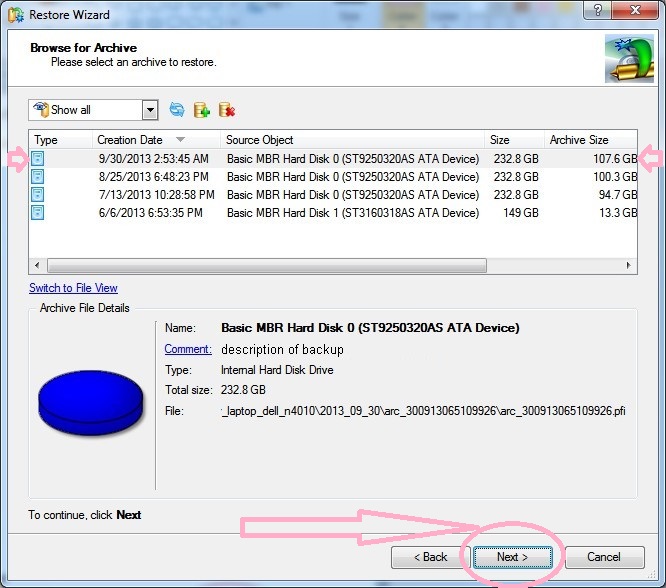
    This will bring up a list of archives available, as seen below.  If there’s one not shown, you can click add_archive_button to browse for another to add to the list.  This is NOT where you select the file in the archive, that comes later.
    archive_list_add-jvked_with_arrow

    Select the archive you want.  Consider dates.  Most recent is often best.

    Click “Next”.

    what_in_archive_1st

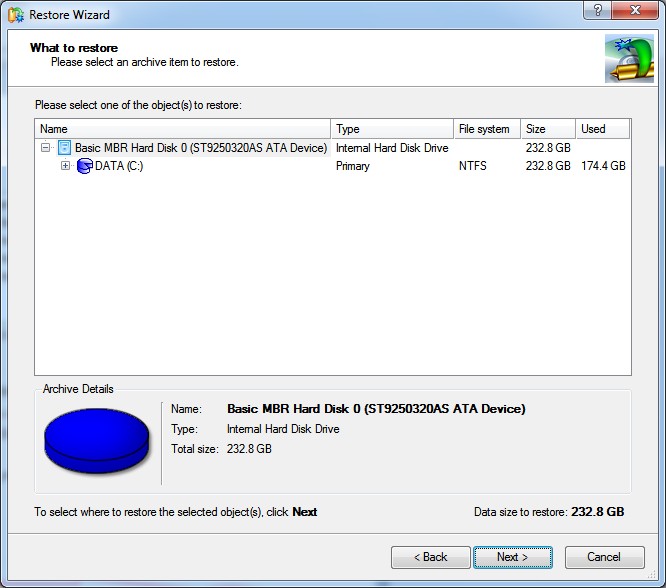
    This brings up the hierarchical selection window as seen above.

    Here you can select the whole “Basic MBR hard disk” to restore you entire disk.

    Or you can click on the + to the left of the C drive and keep clicking + to drill down to a specific file, or files, or directory you want to restore.

    what_in_archive_to_restore_A

    To be continued…

    Online Storage

    Video files are huge. 100MB. 1GB. 5GB.  Depending on resolution, frame rate (frames per second, or “fps”), and length.

    Trouble is, everything online limits files size.  Facebook (currently, Oct 2013) limits videos go 1GB (=1000MB).  GoDaddy WebsiteBuilder limits videos to 150MB.  That’s low.  Email systems limit the size of file you can send. Sometimes to 20MB. That’s even lower.

    Consider an example:

    Say a 1hour video file is 2.5GB. Let’s say we want to put that on our website hosted by GoDaddy. We would have to break it up into 17 separate chunks of 3 minutes 30 seconds each. Hardly convenient.

    So, what to do?

    I think the best answer is paid online storage.  (Un-paid (“free”) online storage, like flickr.com or facebook take ownership of your images and scan them and sell your profile to 3rd parties.)

    Here are the two options i think are the best.  (Dropbox, while paid, is excluded because i sense they sell your profile):

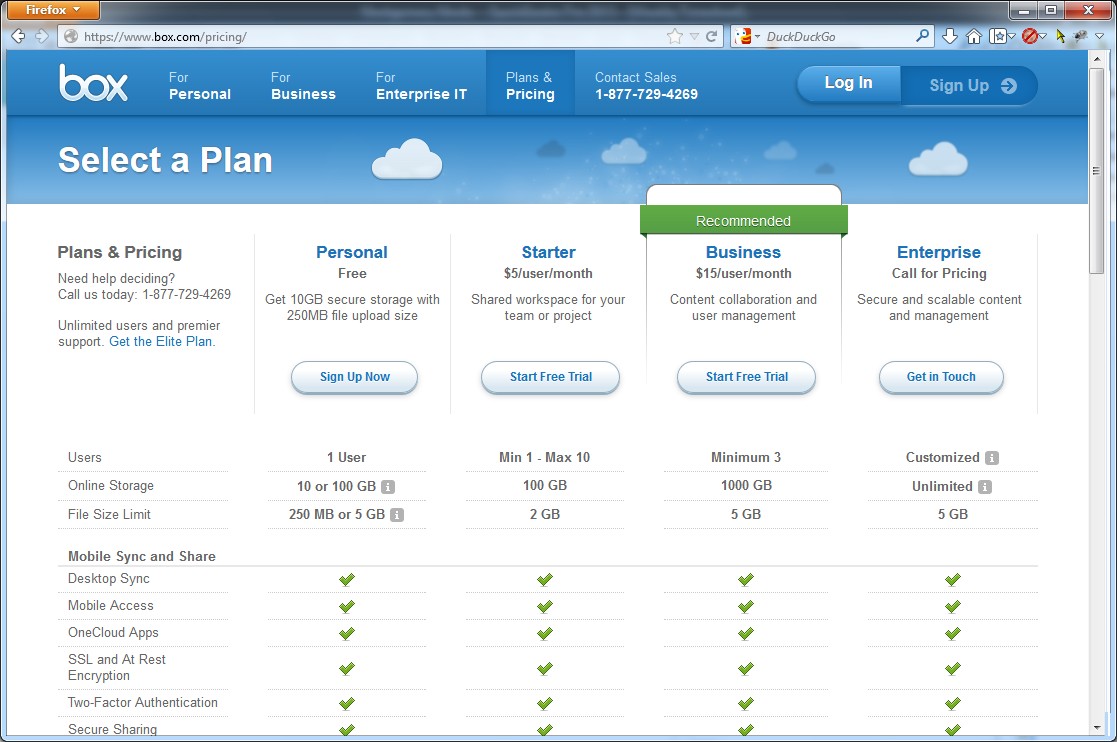
    I think box.net is the best. They have privacy. And not too expensive. $5 for 2GB max file size, 100GB max total storage.
    box_net_prices
    full-size image (via screen capture) | Live Page (link was live on 10/20/2013)

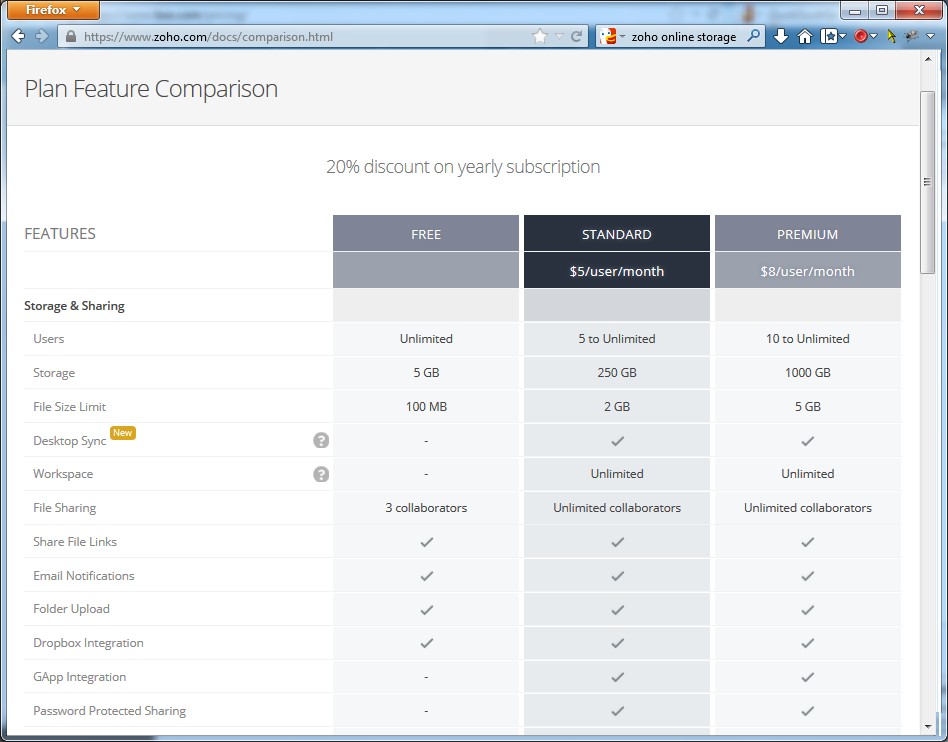
    Another favorite of mine is zoho.com. But in this case their “docs” is too expensive. $25 for 2GB max file size, 250GB max total storage.
    zoho_docs_prices
    full-size image (via screen capture) | Live Page (link was live on 10/20/2013)

    CS Lite MOD – FireFox Add-On – Limits Information Revealed about You Online

    In FireFox you can run an add-on called CS Lite MOD which really helps to limit the information that web companies can gather about you while you surf.  It is highly recommended.

    “CS” stands for “Cookie Safe”.

    The main feature is “Deny Cookies Globally” in the CS Lite -> Options menu.

    Then, website by website, you can turn them back on.

    CS Lite MOD options deny globally_highlighted

    However, there’s a big disadvantage with this approach:

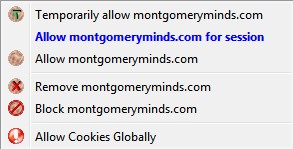
    about 50% of websites will not work.  To make them work, i turn on Temporary cookies for that website.  They go away when i delete the window or tab.  Then i have to turn on Temporary cookies when i return to that website.  There’s an add-on bar icon for it

    cs_lite_icon
    And you can select at which level to allow cookies for each website.
    cs_lite_menu

    For me, the “Temporary” option disappeared on day.  Apparently that’s common, cuz on the CS Lite MOD page there’s a FAQ about it:

    Menu item was not displayed
    The lost menu item be found in a “Menu Items” tab of “CS Lite Options”. Menu item is restored with a “Add” button.


    How To ‘View Source’ or ‘Inspect Element’ Of A Website On Safari?

    From : http://blog.technguide.net/2012/10/how-to-view-sourceinspect-element-of-a-website-on-safari/

    Published by technguide on October 23, 2012 | Leave a response

    There’s a plugin – Firebug – to do just that on Firefox. Google Chrome has it built it, just right-click anywhere in Chrome and the menu is right there. Safari has it built in too! But it’s not activated by default.

    Unless you carefully look at every option in Preferences for Safari, you would most probably miss it. Navigate to Preferences > Advanced and check Show Develop menu in menu bar.

    StatCounter Reports Market Share for Browsers and Operating Systems

    StatCounter has a thing they call GlobalStats (gs for short) that shows the usage of things like operating systems and browsers as measured by their widgets.

    Here are some interesting snapshots (as of Aug 2013). The worldside distribution is in fact different than the USA distribution.

    Click “Source” go to their site to customize dates to see updated stats.

    Browser Usage

    Browser Usage WorldWide

    gstatic_browser_2013_08_to_2008_07_worldwide_mine (Source)

    Browser Usage in the USA

    gstatic_browser_2013_08_to_2008_07_usa_mine (Source)

    Operating System Usage

    Operating System Usage WorldWide

    gstatic_os_2013_08_to_2008_07_worldwide_mine (Source)

    Operating System in the USA

    gstatic_os_2013_08_to_2008_07_usa_mine (Source)